
Back to: TRUMPF PRAXIS Bend and Cut
Production jobs can be created manually by firstly right clicking on a or a group of parts from the part library and then clicking on the new job option at which point the job will be displayed.
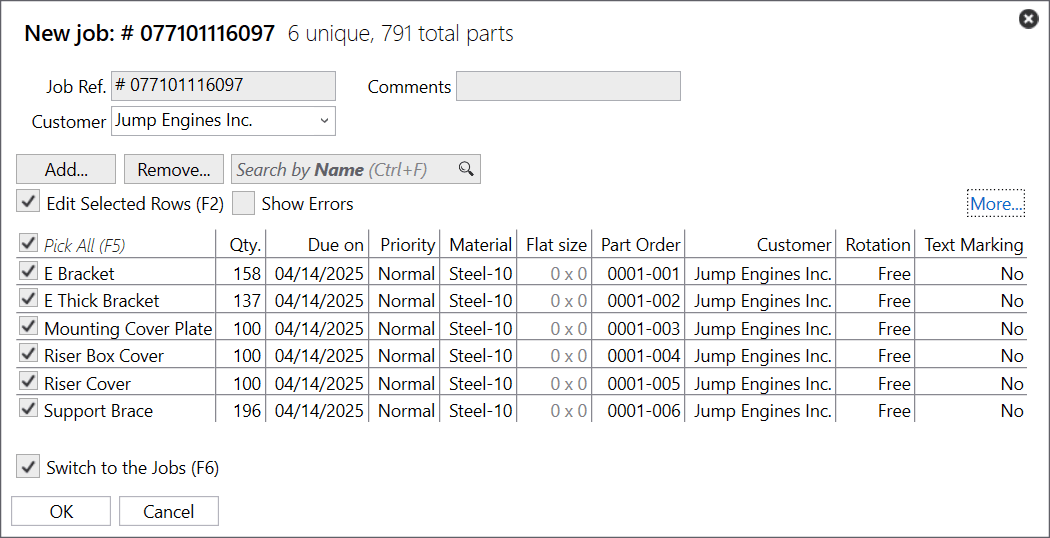
Once the job is displayed you can set some reference information like a Job Reference Number, Customer and any specific comments.
Clicking on the add button you will see a dialog appear of available parts which you can check to select any additional parts along with setting the quantities before clicking on the ok button to return to the job.
In addition to adding, you can also remove them by clicking on the checkbox of the part(s) you wish to remove and clicking on the remove button.
As parts are added to the job you can change information like Quantities, Priorities, Rotation angles and other available fields of information before clicking Ok to create the job.