-
Cell Configuration
-
Automated Bending Workflow
-
-
- Alternating Deposit Type
- Deposit on Conveyor
- Drop to Basket
- Inclined and Inclined Pair
- Manual – Deposit Pattern
- Simple Grid Type
- Weave Deposit Type
- Show all articles (2) Collapse Articles
-
-
-
- Adding Cell Component – Dispenser Station
- Dispenser Panel
- Gripper Panel (Jaw Gripper/ Mechanical Gripper)
- Part Pickup: Using a Blank Dispenser
- Pickup Panel
- Using Jaw Gripper
- Show all articles (1) Collapse Articles
-
-
- Adapt Waypoints
- Display Waypoints
- Modify Waypoints
- Properties of Waypoints
- Simulate Waypoints
- Waypoints Overview
- Show all articles (1) Collapse Articles
-
-
- Extraction Strategy
- Left & Right Extractions
- No Extraction
- Slide Back
- Standard Extraction
- Standard Extraction + Up with Ram
- Tilt-Back Lower Extraction
- Unhook Extraction
- Show all articles (3) Collapse Articles
-
-
-
- Clamp + Station Method
- Clamp Method
- During Bend Method
- Post-Bend Method
- Regrip Methods
- Station Method
- Swivel Option
- Show all articles (2) Collapse Articles
- Adding Re-grip
- Gripper & Suction Panels
- Modify Regrip Position
- Regrip Stations Panel
- Regrip with a Jaw/Mechanical Gripper
- Regripping- RG-Stations
- Remove Regrip
- Show all articles (2) Collapse Articles
-
-
- Deposit Panels
- Navigator
- Pickup Panels
- Robot Panels
- Stage Panels
- Tooling and Gauging Panels
- Show all articles (1) Collapse Articles
-
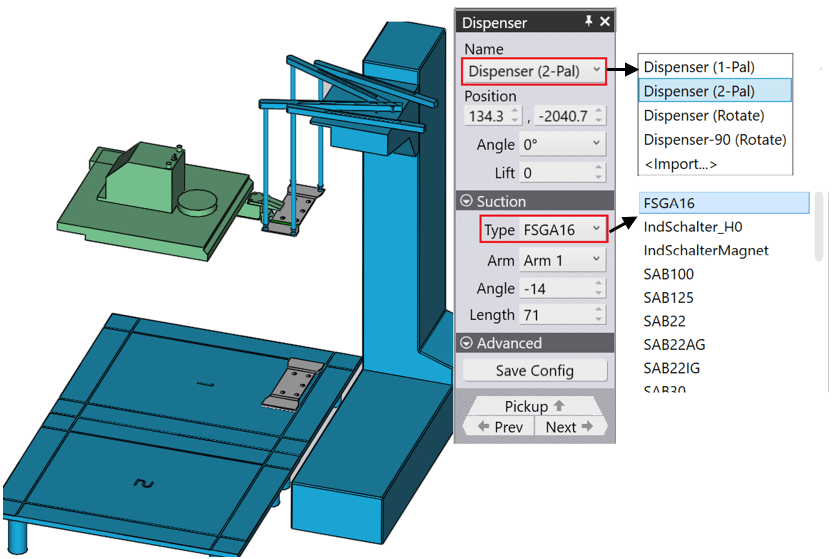
This panel opens when you click on the dispenser. The software has automatically placed the part on the top left corner of the dispenser (where the alignment rules are) and has also positioned the suction gripper arms at the corners of the part. You can edit the arm configuration, and the dispenser location using this panel (the part position cannot be changed, it must always be aligned to the top left corner).
Position – Used to change the values in the direction of Z, X
Angle – Used to control the position and orientation of the dispenser
Suction – Used to control the suction arm configuration.
Once an Arm is selected, you can use the Angle and Length settings to move it. The software does not actually check that the arm suction cups are lying on the part (because this configuration does not actually appear in the NC code, and it is up to the operator to configure the arms in the correct manner).
Pickup – Used to edit the part orientation and gripper position.