-
Cell Configuration
-
Automated Bending Workflow
-
-
- Alternating Deposit Type
- Deposit on Conveyor
- Drop to Basket
- Inclined and Inclined Pair
- Manual – Deposit Pattern
- Simple Grid Type
- Weave Deposit Type
- Show all articles (2) Collapse Articles
-
-
-
- Adding Cell Component – Dispenser Station
- Dispenser Panel
- Gripper Panel (Jaw Gripper/ Mechanical Gripper)
- Part Pickup: Using a Blank Dispenser
- Pickup Panel
- Using Jaw Gripper
- Show all articles (1) Collapse Articles
-
-
- Adapt Waypoints
- Display Waypoints
- Modify Waypoints
- Properties of Waypoints
- Simulate Waypoints
- Waypoints Overview
- Show all articles (1) Collapse Articles
-
-
- Extraction Strategy
- Left & Right Extractions
- No Extraction
- Slide Back
- Standard Extraction
- Standard Extraction + Up with Ram
- Tilt-Back Lower Extraction
- Unhook Extraction
- Show all articles (3) Collapse Articles
-
-
-
- Clamp + Station Method
- Clamp Method
- During Bend Method
- Post-Bend Method
- Regrip Methods
- Station Method
- Swivel Option
- Show all articles (2) Collapse Articles
- Adding Re-grip
- Gripper & Suction Panels
- Modify Regrip Position
- Regrip Stations Panel
- Regrip with a Jaw/Mechanical Gripper
- Regripping- RG-Stations
- Remove Regrip
- Show all articles (2) Collapse Articles
-
-
- Deposit Panels
- Navigator
- Pickup Panels
- Robot Panels
- Stage Panels
- Tooling and Gauging Panels
- Show all articles (1) Collapse Articles
-
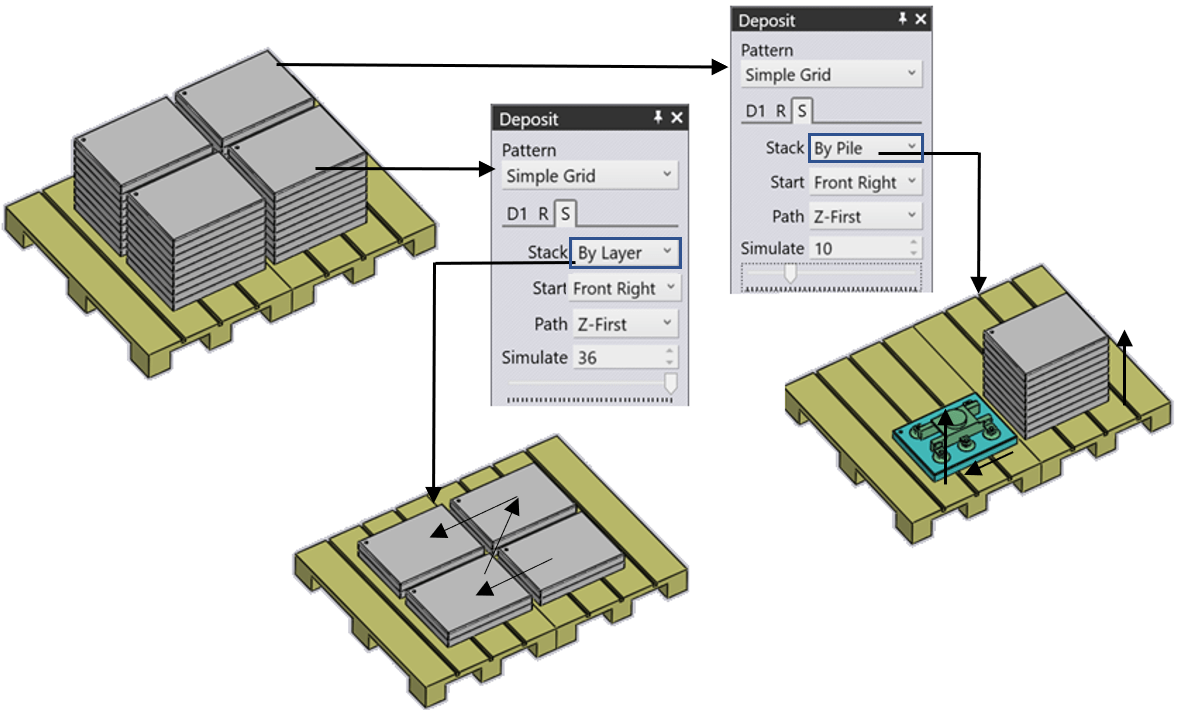
The “S” Stack deposit Sequence can be controlled by this setup and can be modified based on the method we use for the Deposit. For the Simple Grid, we can have one Part sequenced on the pallet using the sequence Stack by Layer or Pile starting from Left or Right along with the Z & X direction can also be controlled using this option.
The Start Corner and Path settings are used when there are multiple rows or columns and decide which corner the stacking starts from and whether the stacking then proceeds row-by-row or column-by-column. This can be useful especially with an off-centre gripper, since a different starting corner may cause a collision between the gripper and the previous part that was already deposited.
The Simulate settings (both the number spinner and the slider) can be used to scrub through the deposits to see the order in which they happen on the pallet. This is especially useful when adjusting the start corner and the path settings.