
-
Cell Configuration
-
Automated Bending Workflow
-
-
- Alternating Deposit Type
- Deposit on Conveyor
- Drop to Basket
- Inclined and Inclined Pair
- Manual – Deposit Pattern
- Simple Grid Type
- Weave Deposit Type
- Show all articles (2) Collapse Articles
-
-
-
- Adding Cell Component – Dispenser Station
- Dispenser Panel
- Gripper Panel (Jaw Gripper/ Mechanical Gripper)
- Part Pickup: Using a Blank Dispenser
- Pickup Panel
- Using Jaw Gripper
- Show all articles (1) Collapse Articles
-
-
- Adapt Waypoints
- Display Waypoints
- Modify Waypoints
- Properties of Waypoints
- Simulate Waypoints
- Waypoints Overview
- Show all articles (1) Collapse Articles
-
-
- Extraction Strategy
- Left & Right Extractions
- No Extraction
- Slide Back
- Standard Extraction
- Standard Extraction + Up with Ram
- Tilt-Back Lower Extraction
- Unhook Extraction
- Show all articles (3) Collapse Articles
-
-
-
- Clamp + Station Method
- Clamp Method
- During Bend Method
- Post-Bend Method
- Regrip Methods
- Station Method
- Swivel Option
- Show all articles (2) Collapse Articles
- Adding Re-grip
- Gripper & Suction Panels
- Modify Regrip Position
- Regrip Stations Panel
- Regrip with a Jaw/Mechanical Gripper
- Regripping- RG-Stations
- Remove Regrip
- Show all articles (2) Collapse Articles
-
-
- Deposit Panels
- Navigator
- Pickup Panels
- Robot Panels
- Stage Panels
- Tooling and Gauging Panels
- Show all articles (1) Collapse Articles
-
The Bend Cell settings can be accessed using the Application or Machine settings.
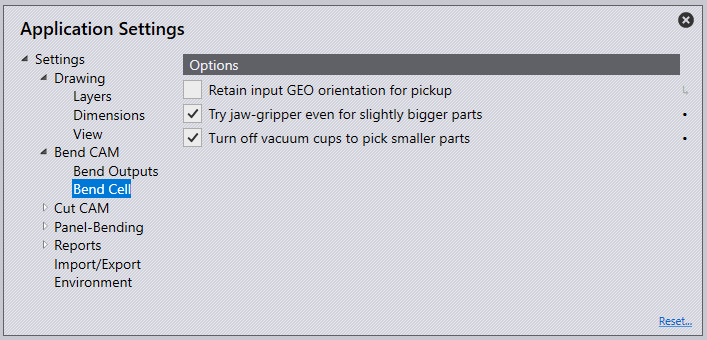
Try jaw-gripper even for slightly bigger parts – This setting tries to use the jaw gripper for parts larger than normal jaw-gripper parts if no suitable vacuum gripper is found.
Turn off vacuum cups to pick smaller parts – This setting tries to pick up a part using a Sub-Gripper: this is just a vacuum gripper where the software turns off one row of suction cups automatically, making it an effectively smaller gripper.
Note 1: These two options are off by default, and you have to turn them on to enable these strategies to be tried.
Note 2: If both these settings are turned ON, then the software tries the jaw-gripper for bigger parts strategy first, and if that does not work, it tries the Sub-Gripper strategy second.
