
When a vacuum suction or magnetic gripper is used, blanks (un-bent flats) are typically picked up from a pallet. Various settings are used to control this process:
- The position of the pallet in the machine cell.
- The position and orientation of the part stack on the pallet.
- The position and orientation of the suction gripper on the part.
- The suction cup configuration of the gripper (which cups are turned on/off, and what type of cups are mounted in each socket).
- The areas of the part that are imaged by the camera on the robot, and used as references for calibrating the part’s position.
Like most of the interfaces in the software, these settings are all viewed and edited using small panels. Most of these panels can be accessed by just clicking on different objects displayed on the screen, in a very intuitive manner
- To open the Pallet panel, click on a pallet.
- To edit the part stack on a pallet (the Pickup panel), click on the blanks lying on the pallet.
- To edit the imaging positions (used by the fine-position recognition system), click on the camera.
- To edit the gripper position on the blank (the Gripper panel), click on the gripper.
- To edit the suction cup configuration of a gripper (the Suction panel), click on one of the suction cups.
New values for a position or an angle are either entered directly or adjusted with the mouse wheel. To do this, move the mouse over the respective input field and adjust the numerical value by turning the mouse wheel (accelerated adjustment by additionally pressing the Ctrl key).
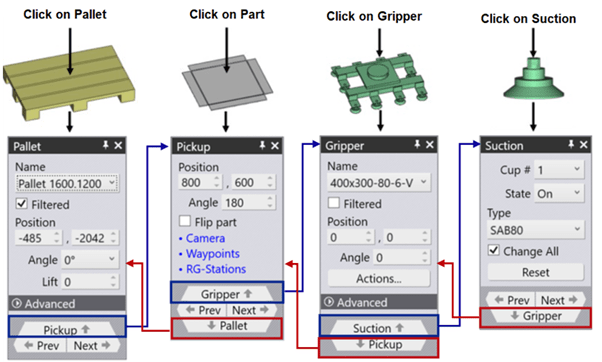
In addition, all these different panels have up/down navigation links leading to the other panels in a logical sequence.
