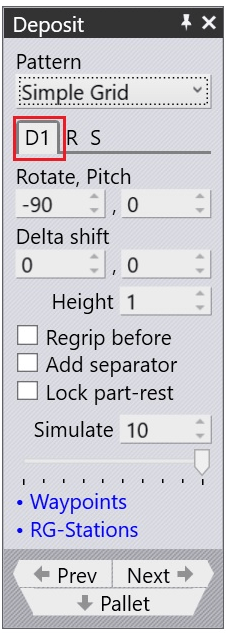
There are several deposit patterns (Simple, Alternating, Weave, Basket etc) as before. Some of these patterns (Alternating, Weave) use parts deposited in two different orientations. The orientation and other settings for these parts are edited in the D1 and optionally the D2 tabs (these also correspond directly with the D1 and D2 deposits on the main navigation bar on the top).
D1 – Used to handle the Part Deposit settings to drop parts over the deposit pallet
Rotate – Used to rotate each part on the Grid about a vertical axis- the pitch of the grid is immediately recomputed to suit. Sometimes rotating a part 90 degrees can help pack more parts on the pallet
Pitch – Used to change the Wrist angle of the Robot at the Dropping position
Delta Shift – shifts each successive part in the deposit relative to the part underneath. You can see a shift of +15mm in the X direction below, used to stack the parts tightly against each other in a stable manner:
Height – Controls the height above the stack from which the part is released (the part falls by this distance when coming to rest on the stack).
Regrip Before – Enabling this will add a Regrip sequence before the part deposit
Add separator – Turning on the Separator switch will add a separator sheet layer between each layer of the stack. It is useful when the parts are irregular and will not stack well on top of each other. The software will automatically add a similar pallet to hold the separator sheet and will program the robot moves required to place a separator sheet on top of each completed layer.