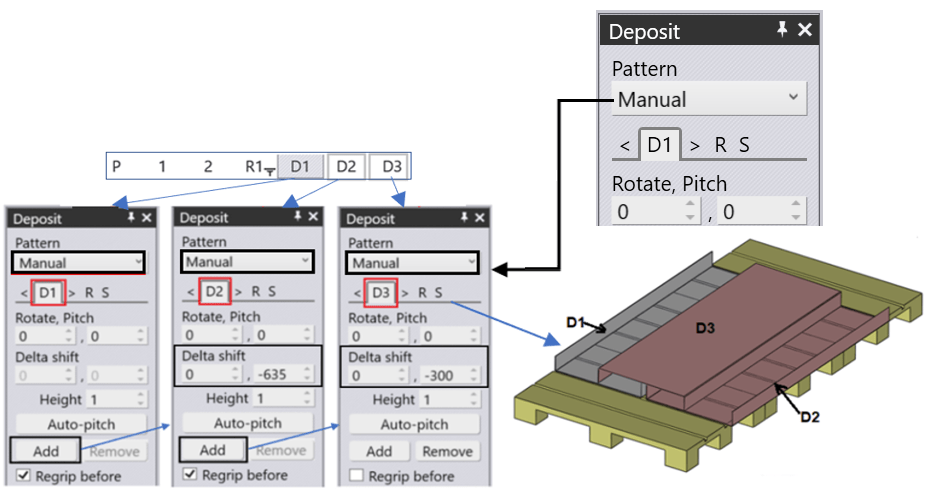
The Manual deposit pattern is used to deposit the parts individually on the pallet. We can add individual Deposit sequences, for example, D1, D2, D3, ….. and can place the parts in the location we prefer. Also, we need to make sure to check the Step Navigator for zero errors in the simulation.
On selecting this, the first part is placed on the pallet. You can adjust the position of the first part on the pallet using the Position settings.
You can add additional parts on top by clicking the Add button. After you add the second part, it is initially positioned exactly on top of the first part, but you can shift it using the Delta shift settings. Here you can see the state after the second part has been shifted 45mm in X. Note that the vertical (R) position of the part is automatically computed as you move it so that it is always exactly touching the other part.
You can also change the Pitch of the second part so it rests stably. In this case, adjusting the pitch angle to 6.86 degrees rotates the part so it is resting stably on the ground. To make this adjustment easier, you can usually just click the Auto-pitch button and the software can compute the ideal pitch angle automatically (sometimes, this may not work, and you can use the Pitch setting to still manually adjust the pitch angle until the part is correctly settled).
After you have trained the software with the first two parts like this, you can add more parts very easily – just keep clicking Add and the subsequent parts are added with the same Delta shift value and with the pitch angle auto-computed. For example, here is the situation after a few more clicks of the Add button (no additional adjustments were made).
Each of the parts has its Deposit icon on the top navigator (D1, D2, D3, D4 etc). So you can adjust the waypoints and other settings for each one of them separately.