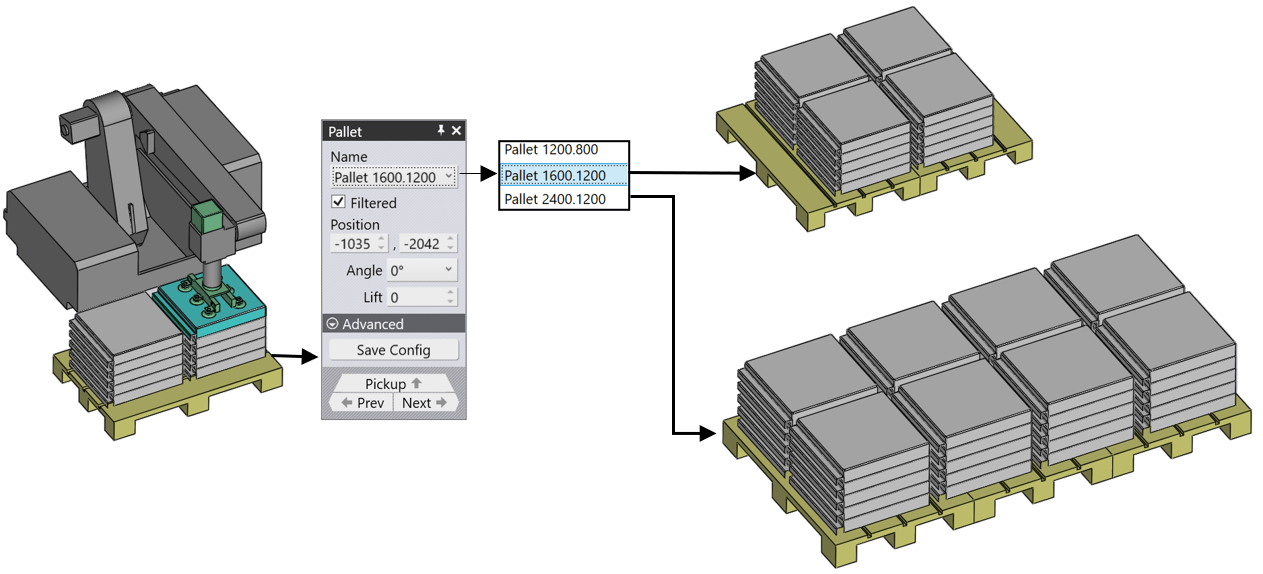
A suitable deposit strategy is suggested based on the current part geometry. If necessary, numerous functions are available for adapting the part deposit.
We can rotate or move the current pallet or combine several pallets into a larger deposit area.
After the bending is completed, the finished part is deposited on a pallet or conveyor or dropped into a basket. Various settings are used to control this deposit operation:
- The position, type and orientation of the deposit pallet.
- The grid of parts on the pallet (rows, columns, layers).
- The orientation of the part on the pallet.
These settings are controlled mainly from the Deposit panel, and also from the Pallet panel that is supporting the deposit. Here is how these panels are accessed:
Click on the deposit pallet (or conveyor, or basket) to open the Pallet panel connected to the deposit.
Click twice on the cells like D1, D2 etc on the bend navigator to open the Deposit panel.
Click on one of the finished parts lying on the deposit pallet to open the Deposit panel.
In addition, these two panels have up/down navigation links leading to each other:
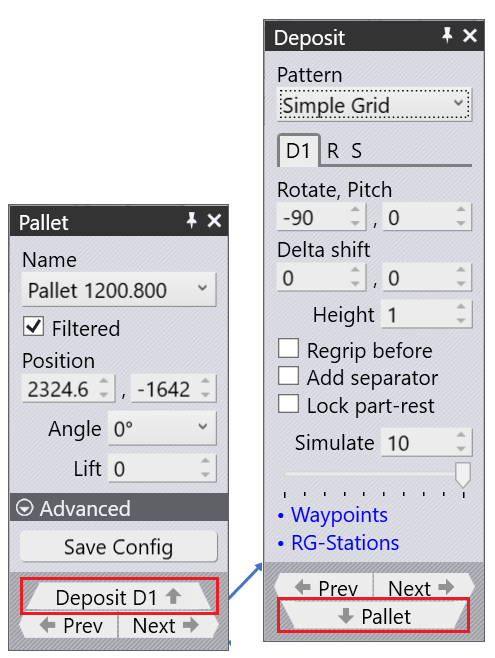
We will further discuss the Part Deposit options used from the below topics
- Adapt Part Deposit
- Adding Parts & Stacks on Deposit
- Varying Part Position & Storage Location
- Deposit Pattern Types
- Simple Grid
- Weave
- Alternating
- Drop to Basket
- Conveyor
- Inclined & Inclined Pair
- Manual