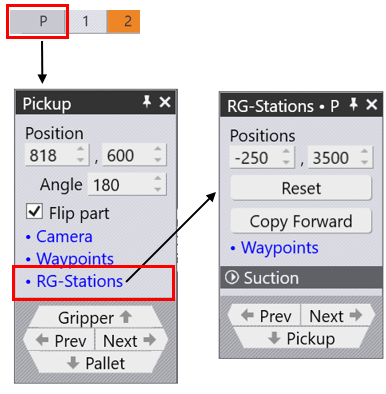
Regripping Stations are referred to as RG-Stations inside the software panels. Before we add the Re-Gripping stations, we can access the stations by selecting the Pickup – “P” from the Navigator and selecting RG-Stations. The Regrip Station panel is used to configure the regripping stations (which ones are used, their positions, and the arm configurations).
Flip Part – Used to place the part upside down relative to the current position. Sometimes this is useful to avoid some collisions between downward-facing flanges and the regrip station arms. The software will immediately recompute a new robot path when you flip the part.
If a regripping station is not being used, the panel is much simpler since the part position cannot be controlled (it depends on the clamping position of the part between punch and die).
Position – Used to adjust the station positions on the rail. In the image provided, the stations are not placed under the part in the beginning. After changing the values in the Positions option, both Stations (suctions) are placed under the part- The RED Arrows indicate the new station positions.
The settings in the Suction section are used to configure the suction arms.
Type – Used to select one of the suction types to be used for this gripper
Arm – Used to select one of the suction cup arms (the one closest to the machine is Arm A).
Angle – Used to rotate the arm around (in 5° steps).
Grid – Used to extend/retract the arm (in 10mm steps).
State – Turn suction on or off
CopyRight – Used to use the same setup for the other side of the RG-Station
Prev and Next – Used to navigate between them.
Regrip R1 – Used to edit the resting position of the part on the regrip stations. As you reconfigure the regrip station, the software checks for collisions with the part, the robot, and the gripper in real time and updates the status indicators immediately.