-
Cell Configuration
-
Automated Bending Workflow
-
-
- Alternating Deposit Type
- Deposit on Conveyor
- Drop to Basket
- Inclined and Inclined Pair
- Manual – Deposit Pattern
- Simple Grid Type
- Weave Deposit Type
- Show all articles (2) Collapse Articles
-
-
-
- Adding Cell Component – Dispenser Station
- Dispenser Panel
- Gripper Panel (Jaw Gripper/ Mechanical Gripper)
- Part Pickup: Using a Blank Dispenser
- Pickup Panel
- Using Jaw Gripper
- Show all articles (1) Collapse Articles
-
-
- Adapt Waypoints
- Display Waypoints
- Modify Waypoints
- Properties of Waypoints
- Simulate Waypoints
- Waypoints Overview
- Show all articles (1) Collapse Articles
-
-
- Extraction Strategy
- Left & Right Extractions
- No Extraction
- Slide Back
- Standard Extraction
- Standard Extraction + Up with Ram
- Tilt-Back Lower Extraction
- Unhook Extraction
- Show all articles (3) Collapse Articles
-
-
-
- Clamp + Station Method
- Clamp Method
- During Bend Method
- Post-Bend Method
- Regrip Methods
- Station Method
- Swivel Option
- Show all articles (2) Collapse Articles
- Adding Re-grip
- Gripper & Suction Panels
- Modify Regrip Position
- Regrip Stations Panel
- Regrip with a Jaw/Mechanical Gripper
- Regripping- RG-Stations
- Remove Regrip
- Show all articles (2) Collapse Articles
-
-
- Deposit Panels
- Navigator
- Pickup Panels
- Robot Panels
- Stage Panels
- Tooling and Gauging Panels
- Show all articles (1) Collapse Articles
-
You can also program a regrip operation when a jaw gripper (mechanical gripper) is being used. First, you can Add a regrip operation by clicking twice on the bend number to open the Bend panel, and then click on the Robot Path button there) and clicking on the Add Regrip button there.
After a regrip operation is added, you can click on the R1 cell in the navigator, or on the robot to edit the regrip operation:
Next Heading – Used to rotate the gripper around to another side of the part (it rotates in 90° steps). As you make these changes, the software will compute a routing path for the gripper to go around the part and pick it up from the other side. All subsequent bends will also have their collision status updated immediately so you can see whether the new regrip position you have chosen is acceptable.
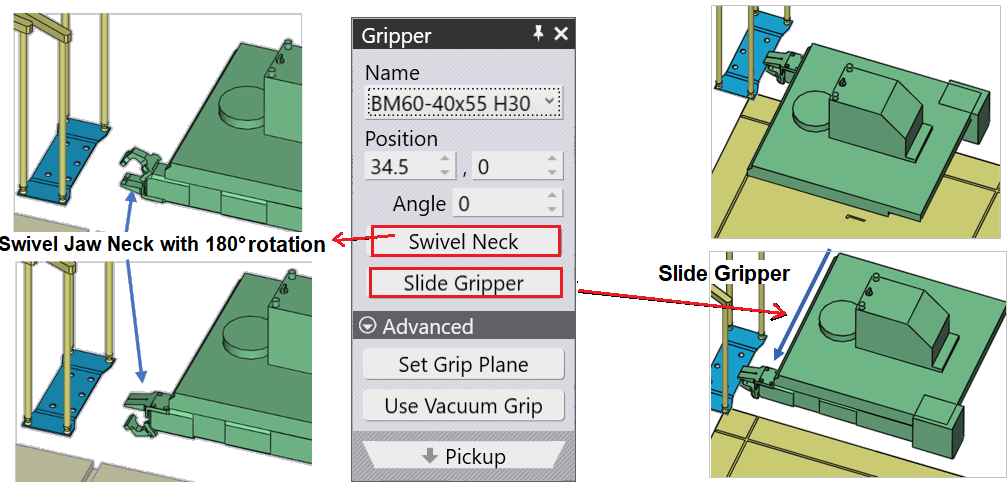
Swivel Neck – Used to rotate the Jaw Neck with 180° rotation.
Slide Gripper – Used to slide the position of the Gripper