
The Suction panel is used to configure the suction-cup layout of a gripper. You can open this panel by clicking directly on a suction cup, or by choosing the Suction link from the Gripper panel.
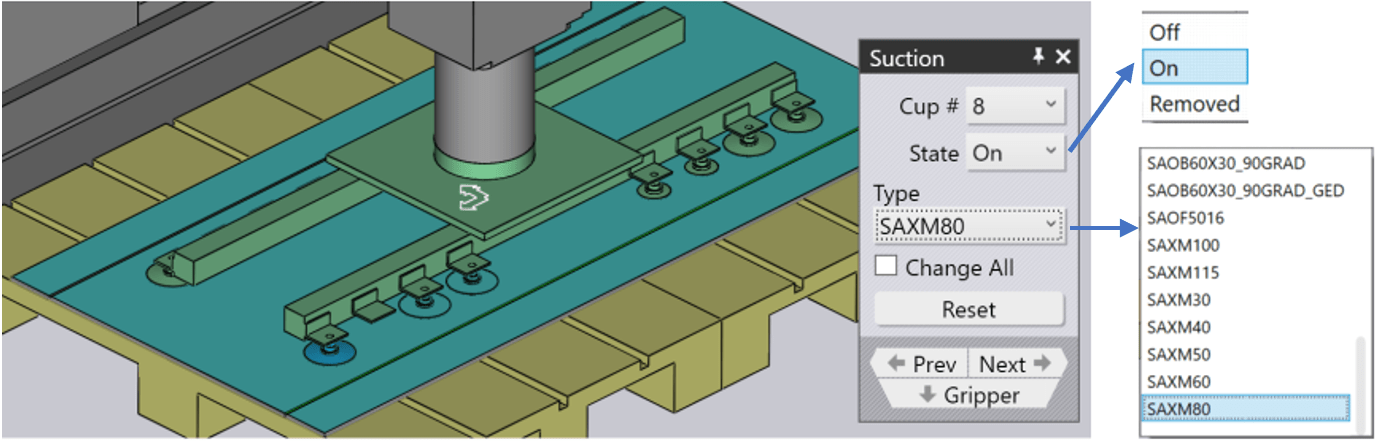
Cup # – Used to select a particular suction cup in the gripper
Type – Used to change to a different type of suction cup. Usually, one changes all the suction cups in a gripper to the new type, but you can also mix and match suction cups by turning off the Change All button and then changing the suction cups. (Note that when you do this, the choice of suction cups will be restricted, since all the suction cups mounted on a gripper frame must have the same working height). The image above shows two of the suction cups replaced with smaller ones (SAXM50, instead of the default SAXM80).
State – For each suction cup, you can choose between three states – On, Off or Removed. The default state for a suction cup is On, which means the suction cup is connected to the vacuum line and helps in lifting. If a suction cup lies over a hole in the part, you can change the state to Off, which means no vacuum. (This reduces the lift of the gripper, and changes the centre-of-lift, which the software takes into account to do gripper capacity checks). Note that the cup is still mounted in the frame, and participates in collision checks. The software displays switched-off suction cups as wireframes, as you can see with two of the suction cups in the image above.
Reset – Used to restore the gripper to its original state – all suction cups are turned on and are reset back to the default cup type that is defined in the gripper. There is no lift from this cup, and it will not cause a collision. This is sometimes useful if a cup falls over a formed region, or causes a collision with the die or machine table during operation.
