
Quick Search
< All Topics

Setup Unloading Lane

Click twice on the last bend number, and then click on Unloading… to open the Unloading settings panel. There, select the Unload Lane:
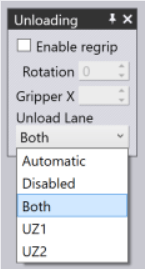
Note: If the part is too big for the Uz1 or the Uz2 lanes, those entries are greyed out. If the part is too big for both lanes, even the Both setting is greyed out.

Was this article helpful?
Please Share Your Feedback
How Can We Improve This Article?
Tags:
Table of Contents
TRUMPF FLUX Modules

Knowledge Base and Training

Please login to access the training and knowledge base

TRUMPF FLUX Modules

Manage access for your employees to see the Knowledgebase and Training.

Please sign in to manage your group.

You don't have permission to edit the profile.
TRUMPF FLUX Modules

Please login to send us a request for help.