
Panel-Bending Output Settings
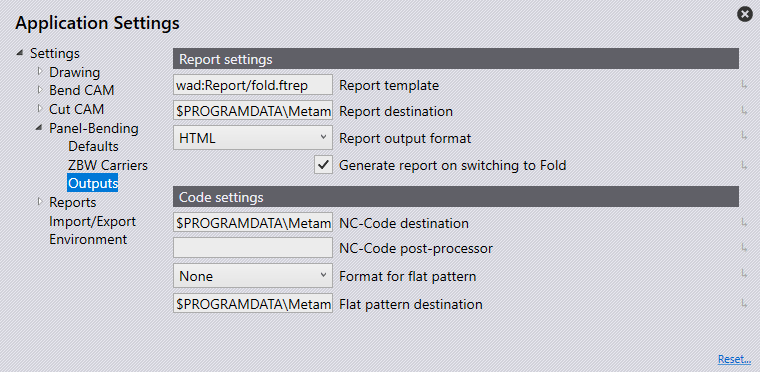
Report Settings
Report template – This is the location and the name of the template to be used for the appearance of the reports.
Report Destination – Set this as the location for all report files to be saved to.
Report output format – This can either be set as HTML or PDF. Note: for PDF to use the multimedia and 3D content Adobe Acrobat Reader must be installed.
Generate report on switching to bend – Turn this on for a report to automatically generate when switching to bend and a solution has been found. If the solution detects any errors or warnings the report will not be generated.
Code Settings
NC-Code destination – Set this as the location for all NC Code files to be saved.
NC-Code post-processor – This is the location and name of a batch file or external tool to refer to when generating the NC code.
Format for the flat pattern – This can be set as GEO, DXF, or PDG for the default file export option when automatically saving a flat pattern. When a solution is found for a part, the flat pattern can automatically export and save in the flat pattern destination, however, if errors or warnings are found, the flat pattern will need to be saved manually.
Flat pattern destination – Set this as the location for all flat patterns to be saved.
