
Editing the Blank Holders
Clicking on the blank holder brings up the BH panel (blank-holder panel).
Clicking on the upper blank holder displays a redesigned editor panel where there are 4 choices of blank-holder choices for each bend:
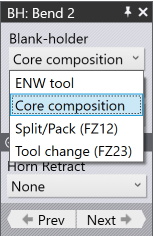
Core composition – This bend uses the standard blank-holder composition as specified in the part header
Split/Pack (FZ12) – This bend uses the core composition, with additional blank-holder segments added or removed using split/pack operations
ENW tool – The bend uses an ENW tool (with its own composition)
Tool change (FZ23) – This is the new option, that allows this bend to use a completely new blank-holder composition, created using an FZ23.
Selecting the FZ23 option displays these further options:
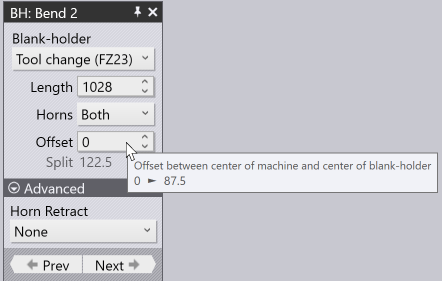
The Length and Horn settings are similar to the ones used for the normal blank-holder composition.
The parameter Offset is used to set the Z-offset between the machining centre and the blank-holder centre. By default, Flux tries to set this to 0 (centring the blank holder), but you can increase this offset with the side effect of increasing the blank-holder split. At the maximum possible split, the blank holder split (gap) will increase to 210 mm, but the blank holder will of course then not be centred on the machining centre.
The split is also displayed as a viewable parameter so you can see the resulting gap as you adjust the offset.
As you experiment with various ENW tools, Flux will immediately compute the collision status of that blank-holder composition for all the bends in the part and will update the Fold Navigator status. Thus, it is very simple to pick a suitable ENW tool by scrolling through this list, since there is immediate feedback on whether any bends have issues with the selected tool.
