
Quick Search
Setup Unloading Lane
Click twice on the last bend number, and then click on Unloading… to open the Unloading settings panel. There, select the Unload Lane:
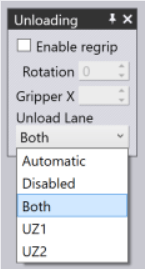
Note: If the part is too big for the Uz1 or the Uz2 lanes, those entries are greyed out. If the part is too big for both lanes, even the Both setting is greyed out.
