
ZBW Carrier Settings
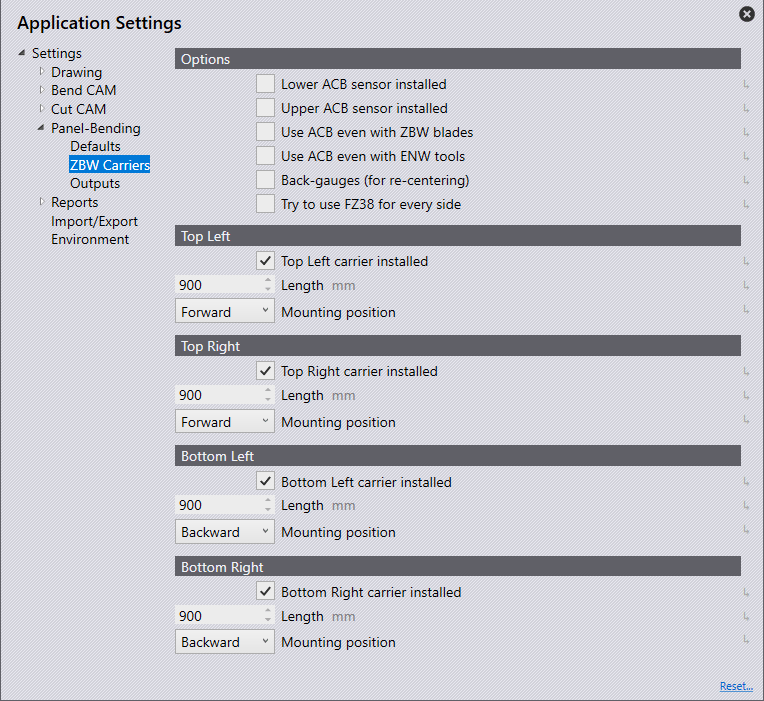
Options
Lower ACB sensor installed – Enable this if the machine has a lower ACB sensor
Upper ACB sensor installed – Enable this if the machine has an upper ACB sensor
Use ACB even with ZBW blades & Use ACB even with ENW tools – These settings control whether the ACB measurements are used with ZBW blades and with ENW tools
Back-gauges (for re-centring) – This option is only available if the re-centring option is available for this machine (back gauges are installed). If this is turned on, the only possible mounting position for the lower ZBW carriers is the Backward position. This setting is available only on the 7030 machines.
Try to use FZ38 for every side – The gauges are used for every side if a valid gauging position can be computed.
Top Left/Right & Bottom Left/Right
Top Left/Right carrier installed – Enable this if a Top Left/Right carrier is installed.
Bottom Left/Right carrier installed – Enable this if a Bottom Left/Right carrier is installed.
Length – Use this to enter the length of the carrier.
Mounting position – Use this to enter the mounting position of the carrier.
